Free Laptop for High School Students: Guide to Get One 100% Free
Free laptops for high school students are available through government programs and nonprofits.

Free laptops for high school students are available through government programs and nonprofits. If you’re a low-income student, you may qualify for a free laptop through programs like Lifeline, PCs for People, and Human-I-T. These organizations help bridge the digital divide by providing affordable laptops to students who need them most.
This guide explains the best program, how you can apply, who qualifies, and what devices you may receive. Apply today to get a free laptop.
Do High Schoolers Get Laptops for 100% Free?
Yes, high schoolers can get laptops for 100% free or discounted through programs like Lifeline, nonprofit organizations, and government-backed initiatives. These programs are designed to help low-income students gain access to the technology they need for schoolwork and distance learning.
Here’s a list of programs offering free/discounted laptops:
- PCs for People: Offers refurbished laptops for $50–$150 if the student’s family receives EBT or Medicaid.
- Human-I-T: Provides discounted Chromebooks along with digital literacy support to help students use technology effectively.
- EveryoneOn.org: Connects families to local device donation programs, providing access to affordable laptops and tablets.
- Lifeline Program: For a 100% free laptop, the Lifeline Program is the best option for eligible students. Through Lifeline providers, they can get free or discounted devices, including laptops, tablets, and smartphones. With Lifeline, students can also receive free monthly services, such as talk, text, and data.

The Lifeline program is a reliable choice to get a free laptop for low-income students (Image by Freepik)
Lifeline Program – The Best Choice to Get a Free Laptop for High School Students
**The Lifeline Program is the best option to get a free laptop for high school students. **This government-backed program helps low-income individuals access essential devices and services to allow for education, work, and daily communication.
2.1. Lifeline Program Overview
The Federal Communications Commission (FCC) launched the Lifeline program in 1985, and it is now managed by the Universal Service Administrative Company (USAC). The program is designed to support low-income households by offering monthly service subsidies and discounts on devices. Lifeline support subsidies, including:
- Up to $9.25/month standard discount for eligible users
- Up to $34.25/month for tribal residents
2.2. How Lifeline Helps Students Stay Connected
Lifeline is a great solution for students who need a free laptop or tablet for their studies. By applying to a Lifeline provider, students gain access to digital devices and essential internet services, helping to bridge the digital divide.
- Free/highly discounted device, up to 70% off the retail price (laptop, tablet, and smartphone)
- Free talk, text, and monthly data for educational use
- A free SIM card or eSIM
- International calling for communication with family or school abroad to over 200 nations.
- No contracts or monthly bills
- Extra benefits, depending on the provider’s offer, to enhance the student’s learning experience.
These benefits allow students to participate in distance learning, complete their homework, and keep in touch without worrying about high costs.
2.3. Who’s Eligible to Receive a Free Device Through Lifeline
To qualify for a free device through Lifeline, students must meet one of the following criteria:
- Participate in government assistance programs like SNAP, Medicaid, SSI, or Section 8.
- Have a household income at or below 135% of the Federal Poverty Guidelines.
Tribal residents may also qualify through tribal-specific programs such as Tribal TANF, FDPIR, Bureau of Indian Affairs General Assistance.
Check the detailed Lifeline eligibility requirements here to confirm your qualification.
Best Free Laptop or Tablets Available for High School Students
3.1. Free Laptop Available
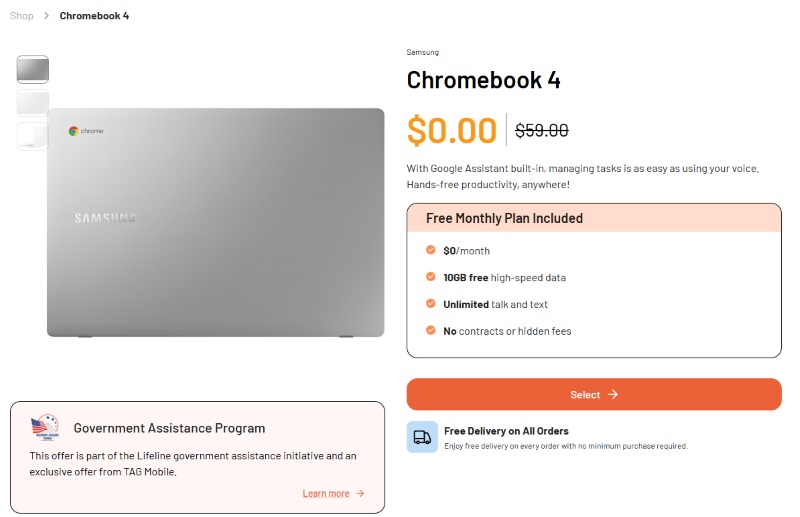
**Why it’s ideal for students: **The Samsung Chromebook 4 are perfect for Zoom calls, assignments, and basic browsing. It’s a reliable, affordable device that meets most students’ educational needs. Key features include:
- 11.6-inch HD display: Ideal for everyday tasks, including browsing, light media consumption, and homework.
- Intel Celeron N3350 Processor: Provides smooth performance for tasks like email, web browsing, and document editing.
- **4GB RAM and 32GB storage: **Great for cloud storage and lightweight apps.
- **12.5 hours of battery life: **Offers long-lasting performance, so students can get through the day without worrying about charging.
- **Chrome OS: **Secure and easy-to-use, with automatic updates for convenience.
Along with the laptop, eligible users also receive:
- $0/month plan (no hidden fees)
- Free shipping to your address
- Up to 15GB+ high-speed data (depending on availability in your area)
- Unlimited talk and text for communication
- Free international calling to over 200 countries
- Free SIM card for the BYOD (Bring Your Own Device) option
3.2. Other Free/Discounted Devices (If Laptops Are Out of Stock)
How to Apply for a Student Laptop?
3.2 Prepare Necessary Documents
Before you start the application process, gather the necessary documents to prove your eligibility. Most providers may ask for:
- **Proof of eligibility: **This could include your SNAP, Medicaid, SSI, or Tribal benefits enrollment.
- Proof of income: If your eligibility is income-based, you’ll need to provide a pay stub, tax return, or benefit letter.
- **Government-issued ID: **You may need to upload an ID to verify your identity.
Having these documents ready will speed up the process and help ensure your application is approved quickly.
3.3 Follow the Step-by-step Guide
The plans will include the free phone, tablet, or laptop options that you qualify for, based on your eligibility. Hit “Select Now” to continue.
Choose the device you would like to receive. If Chromebooks are available, you can select one. If not, you can choose a tablet or smartphone as an alternative.
Step 4: Fill Out the Application Form
Fill out the application form with accurate personal details. This includes your name, address, phone number, and other necessary information.
If required, upload the documents to verify your eligibility, such as proof of income or benefits. Make sure all information is correct to avoid delays.
Submit your form and wait for approval** (usually within 30 minutes to 3 days).**
Once your application is approved, your free laptop or tablet will be shipped after 7–10 business days, and the package will include setup and activation instructions.
FAQs
**How to Get a Free Laptop from Goodwill? **
You can get a free laptop for high school students from Goodwill by applying through their local donation programs. Availability varies, and typically, you’ll need to meet eligibility criteria such as income level.
Check your local Goodwill for specific details on laptop availability and application requirements.
Final Words
Getting a free laptop for high school students has never been easier. Through Lifeline and other nonprofit organizations, students can access free laptops that help with learning, communication, and job opportunities.